
























WunderGraph Cosmo is the open-source alternative to Apollo GraphOS. Both implement Apollo Federation, so subgraphs usually move between them without schema changes. The difference is licensing and where the platform runs: Cosmo's router, schema registry, Studio, and analytics are Apache 2.0 and can run entirely in your own infrastructure, while Apollo Router is source-available under the Elastic License 2.0 (ELv2) and the rest of GraphOS is a hosted SaaS platform. Cosmo also still runs Federation v1 supergraphs, which Apollo Router 1.60 and later do not.
What do Apollo GraphOS and WunderGraph Cosmo have in common?
Both Apollo GraphOS and WunderGraph Cosmo implement GraphQL Federation using the Federation Specification.
They support many of the same federation directives, such as @key, @external, @requires, and @override. These directives define how your services fit together.
Beyond compatibility, the developer workflows are similar, with support for schema changes, CI integration, observability, and router orchestration.
Where they begin to diverge is in control and flexibility.
What are the differences between Apollo GraphOS and WunderGraph Cosmo?
The biggest difference is licensing and where the platform runs: Cosmo is open source and can run entirely in your own infrastructure, while Apollo GraphOS is a hosted SaaS platform whose router is source-available. Cosmo is 100% open source under the Apache 2.0 license and can be self hosted anywhere. Apollo GraphOS is a SaaS platform built around a hosted model. The Apollo Router is source available under the Elastic License 2.0 (ELv2). This means the code is accessible and can be modified. However, ELv2 is not an open source license. It places limits on how the software can be used, especially in commercial or competitive products. The rest of the Apollo stack, including the schema registry, Apollo Studio, and analytics, is fully managed and proprietary.
Most GraphQL federation platforms rely on a set of core services. These typically include a schema registry for managing and composing subgraphs, a router to plan and execute queries across services, a user interface for graph visibility and collaboration, and a command line tool to support local development, CI workflows, and automation.
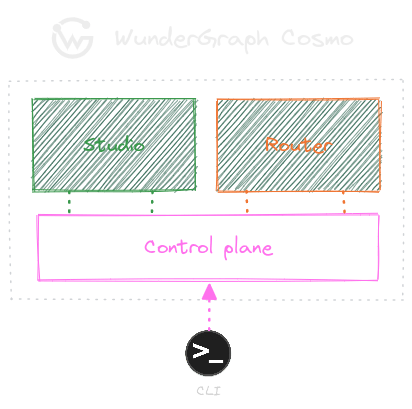
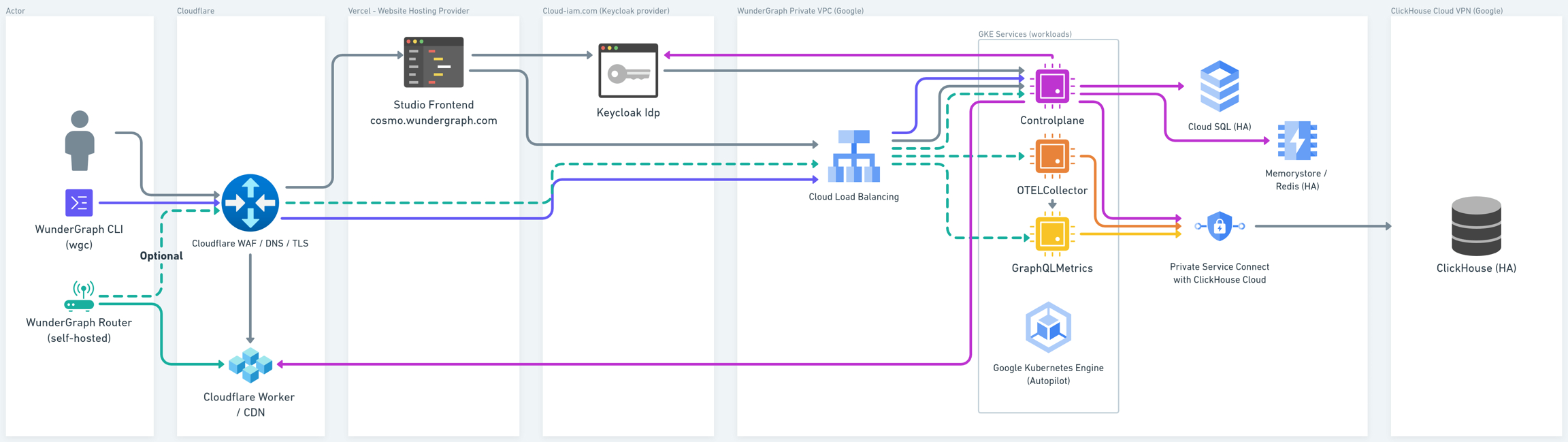
WunderGraph Cosmo expands on those core services with a modular, open setup. Router configs are delivered through a globally distributed CDN (your choice of Cloudflare, AWS, or custom). Keycloak handles SSO and identity federation, with support for OIDC and SCIM. OpenTelemetry, Prometheus, and ClickHouse power monitoring and observability.
Advantages of Open Source and Infrastructure Flexibility
Because Cosmo is Apache 2.0, you can run every part of it, including the router, schema registry, and Studio, inside your own network, read the code, and keep running it without a commercial contract.
Cosmo’s architecture is built for teams that want deep visibility into their infrastructure.
You can run the Cosmo Router in your own environment to maintain control over network boundaries, performance, and security. This level of control is paramount in systems where compliance or low latency is a priority. Paired with Cosmo Studio, you get detailed observability and query plan insights without relying on an external cloud provider.
Getting started is straightforward. You can use Docker Compose to spin up the stack locally, or use the managed service by signing up for Cosmo Cloud. Cosmo integrates into existing CI workflows, which makes it easy to go from local testing to production deployment.
Is there a difference in how Apollo and WunderGraph handle GraphQL Federation?
For subgraph developers, not much: both platforms implement the Federation Specification and support the same core directives, so the differences are in the router rather than the schema. From a developer’s perspective, they behave similarly. Subgraphs can typically be used with either router without any modification.
The main differences are under the hood: how routers plan and execute queries, how routing is extended, and how configuration is handled. Cosmo extends the router with Go custom modules and gRPC router plugins, while Apollo uses Rhai scripts, external coprocessors, or native Rust plugins.
How does Cosmo Router compare to Apollo Router & Apollo Gateway?
Cosmo Router is an Apache 2.0 router written in Go and compatible with Apollo Federation v1 and the v2 directives through Federation 2.5. Apollo Router is written in Rust and source-available under ELv2, and Apollo Gateway is Apollo's older Node.js gateway. All three route and execute queries in a federated GraphQL API.
Apollo Gateway, written in Node.js, supports Federation v1 and, from version 2.0, Federation 2. Apollo now recommends its Rust-based successor, Apollo Router, which is licensed under the Elastic License.
Cosmo Router is written in Go and fully open source under the Apache 2.0 license. It supports Apollo Federation v1 and the v2 directives through Federation 2.5, including the Federation v1 supergraphs that Apollo Router 1.60 and later no longer run.
Router Performance and Benchmarking
Cosmo Router cuts router overhead with breadth-first batching of subgraph requests, single-flight deduplication of identical in-flight fetches, and query-plan caching, plus a cache warmer for operations that are slow to plan.
If you're comparing Cosmo Router and Apollo Router head-to-head, it's worth focusing on how they behave in real-world conditions and not just synthetic benchmarks or warm-cache scenarios.
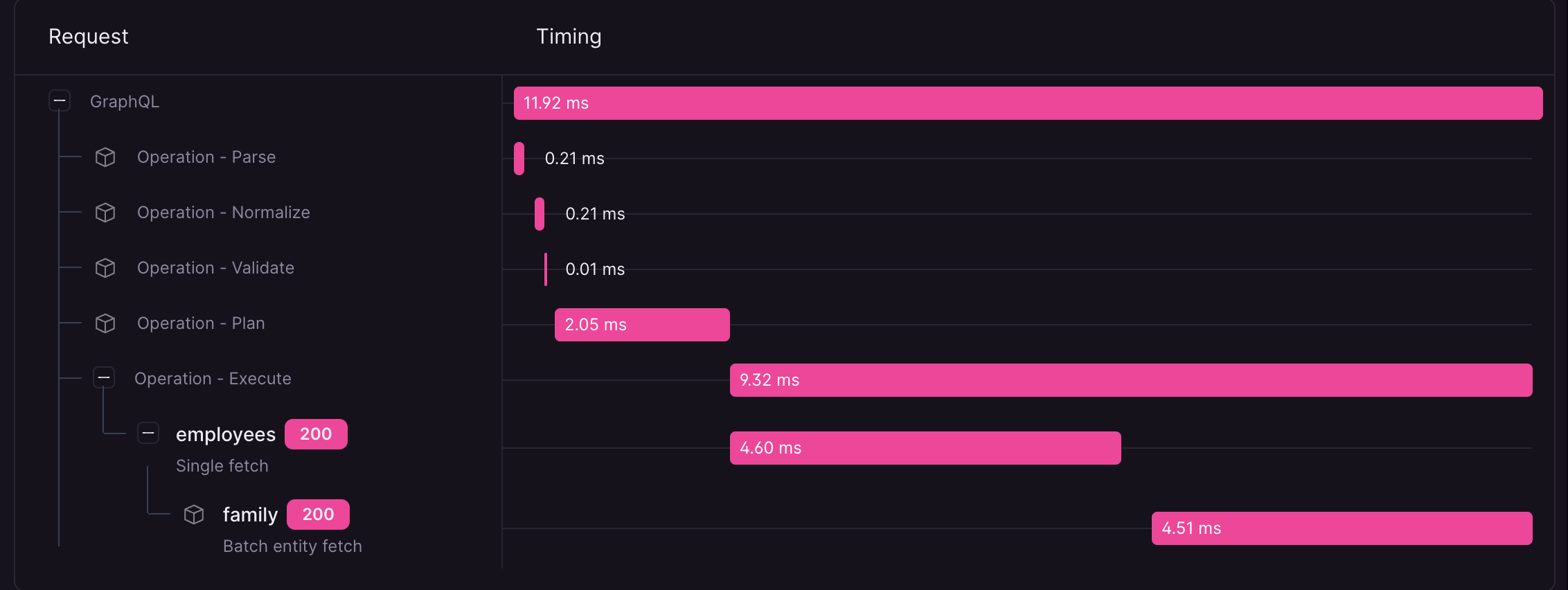
Cosmo Router is built to minimize overhead and maximize throughput in production environments. Router overhead comes from five places: HTTP server behavior; query parsing, normalization, validation, and planning; execution plan shape and caching; subgraph response merging and serialization; and observability and telemetry.
Cosmo addresses these with Dataloader 3.0, a breadth-first batching strategy that reduces memory pressure while maintaining throughput. AST-JSON merges and serializes subgraph responses without unnecessary allocations. Advanced Request Tracing (ART) shows how each query flows through the router.
Planning speed matters too. Most queries plan quickly, but with GraphQL's flexibility, some take longer to plan. In those cases, Cosmo uses a cache warming strategy to prepare execution plans ahead of time so the router is always ready when traffic hits.
If you're evaluating routing performance and want to see internal benchmarks or walkthroughs, reach out to our team.
How does Cosmo Studio compare to Apollo Studio?
Cosmo Studio does the same core jobs as Apollo Studio, but it also runs in your own infrastructure, while Apollo Studio runs only in Apollo's cloud. Both provide a visual interface for managing a federated GraphQL API. You can explore schemas, inspect query plans, monitor usage, and evolve your graph safely over time.
The real difference is in what each platform lets you see and do.
Cosmo Studio gives teams full visibility and control. It works the same whether you use the managed platform or are running it in your own infrastructure. Features like advanced request tracing, environment isolation through namespaces, and role-based access control (on Cosmo Cloud, from the Scale plan) are included. Teams can also assign subgraph ownership using role based permissions to support safe collaboration across services.
Apollo Studio offers a streamlined experience, but it only runs in Apollo's cloud.
With Cosmo, you are not just operating a router. You are gaining insight into how your entire graph is behaving. Cosmo Studio gives you the tools to understand and manage your own architecture.
How Apollo GraphOS and WunderGraph Cosmo package features
Cosmo's open-source and Cosmo Cloud editions share the same router, schema registry, and Studio code; Cosmo Cloud adds a high-volume analytics pipeline and plan-based features. The table below shows what each Cosmo edition includes.
While both platforms support GraphQL Federation at scale, the way they package and deliver features differs significantly, especially when it comes to self hosting, licensing, and flexibility.
Apollo separates functionality across multiple components. The Apollo Router is licensed under ELv2, which allows source access but imposes restrictions on commercial usage. GraphOS Studio is available only as a managed SaaS offering, and some features are limited to higher pricing tiers.
Cosmo, by contrast, ships one open-source codebase for both self-hosted and managed deployments. On Cosmo Cloud, RBAC and SSO start on the Scale plan, and SCIM and login-method restrictions are Enterprise features.
The table below shows which capabilities are included in Cosmo Open Source and Cosmo Cloud.
| WunderGraph Cosmo Open Source | WunderGraph Cosmo Cloud | |
|---|---|---|
| Self hosted Router | ✓ | ✓ |
| GraphQL Subscriptions | ✓ | ✓ |
| Authentication (JWT) | ✓ | ✓ |
| Authorization Directives | ✓ | ✓ |
| Query Plan Caching | ✓ | ✓ |
| Operation Limits & Safelisting | ✓ | ✓ (Scale plan and up) |
| Custom telemetry attributes & spans | ✓ | ✓ |
| Schema Filtering (contracts) | ✓ | ✓ |
| Datadog Integration | ✓ | ✓ (Scale plan and up) |
| SSO (Okta, Azure AD) | ✓ | ✓ (Scale plan and up) |
| Role-based Access Control (RBAC) | ✓ | ✓ (Scale plan and up) |
| Build status notifications | ✓ | ✓ |
| Open Telemetry (OTEL) | ✓ | ✓ |
| Cosmo Streams (EDFS) | ✓ | ✓ |
| Cache Warming | ✓ (in-memory fallback) | ✓ (CDN-based warming on Enterprise) |
| Billion Requests Analytics Pipeline | ❌ | ✓ |
The open source version of Cosmo includes a simple, self hostable analytics pipeline. For large-scale workloads, Cosmo Cloud uses a more advanced implementation—built on Kafka, ClickHouse, and ClickPipes—to support billions of requests per day. This setup isn’t included in the open source repo, as it’s tailored specifically for managed infrastructure and operational scale.
The Benefits of Cosmo Cloud
Cosmo Cloud is WunderGraph's managed control plane: it runs the schema registry, Studio, and analytics for you, while you run the router in your own infrastructure.
Cosmo Cloud is a managed platform built on the same open source components as Cosmo OSS, designed to be secure, reliable, and globally scalable.
Router configuration is served via a global CDN for low-latency updates.
At higher volumes, analytics and usage metrics become critical. Cosmo Cloud includes a purpose-built telemetry pipeline based on Kafka, ClickHouse, and ClickPipes. It’s designed to handle billions of requests per day and power features like schema usage tracking, breaking change detection, and historical insights.
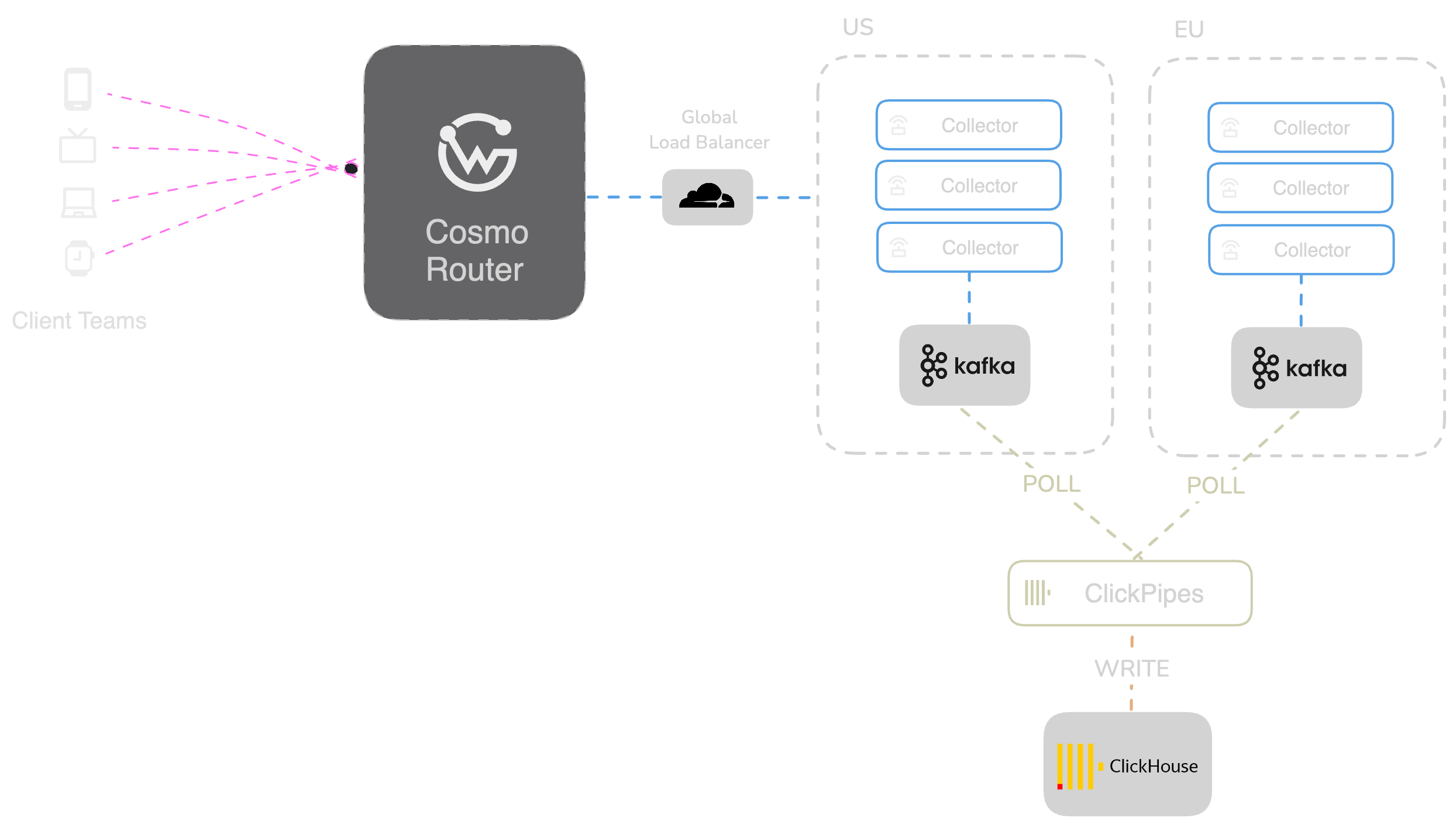
For a closer look at how the system works behind the scenes, read our post on scaling GraphQL schema usage to billions of requests per day.
Why is there no Enterprise Version of Cosmo?
Cosmo has no separate enterprise edition of its code; WunderGraph's Enterprise plan adds support, contracts, SLAs, and some Cosmo Cloud features, such as login-method restrictions.
We’ve kept Cosmo as a single, unified codebase for one reason: it helps us move faster, stay transparent, and build a better product for everyone.
We don’t maintain a separate enterprise version of the code. That means no separate enterprise build of the router, registry, or Studio; only Cosmo Cloud's high-volume analytics pipeline is not in the public repo. Everything is developed in the open, tested together, and released together.
Velocity is another reason. With a monorepo and a shared pipeline, we can make changes across the stack in one pull request and ship confidently. We even publish pre-release Docker images with every update so you can try things early and give feedback.
We also believe open collaboration leads to stronger design. That’s why we run open RFC discussions on GitHub and welcome input from teams using Cosmo in production.
Security, too, benefits from openness. The code is auditable. The issues are public. There’s no hidden behavior or black-box implementation.
Instead of creating an “Enterprise Edition,” we provide enterprise-level support, contracts, and SLAs on top of the same open-source codebase that anyone can use. It’s simpler, more sustainable—and much easier to grow with.
Managed vs Self-Hosted: Apollo GraphOS vs Cosmo
Cosmo Router runs in your own cloud, data center, or hybrid setup, and you choose whether WunderGraph manages the control plane (Cosmo Cloud) or the whole stack, routers included, inside your own cloud account (Managed On-Premises).
Apollo GraphOS runs its schema registry and Studio as a managed service in Apollo’s infrastructure.
WunderGraph Cosmo takes a different approach. Rather than hosting the Router for you, Cosmo is designed to integrate into your infrastructure, whether you're running in the cloud, on-premises, or in a hybrid setup.
Many teams prefer this level of control. Running the Router yourself means you decide where and how it’s deployed—close to your subgraphs, compliant with your policies, and scaled on your terms.
Cosmo does not include a hosted Router service as part of the platform. Instead, it provides open tooling and support so you can run the Router in your own infrastructure, wherever it makes the most sense for your use case. This allows us to focus on building features, performance, and long term flexibility across the entire Cosmo stack, without adding infrastructure overhead.
What are the ideal use cases for choosing WunderGraph Cosmo?
Cosmo fits teams that want to run their federation router in their own infrastructure, from a small team pairing a self-hosted router with the managed registry in Cosmo Cloud to an enterprise that needs SLAs and compliance support.
WunderGraph Cosmo is built to support a wide range of deployment strategies, from lightweight setups to fully managed enterprise environments.
Your startup or small team can run the Router in your own environment while using the managed schema registry and Studio. Advanced observability is available from the start. On Cosmo Cloud, SSO and RBAC start on the Scale plan, and SCIM is an Enterprise feature.
For hybrid enterprise environments, Cosmo Cloud provides a managed control plane with support for service level agreements, compliance, and collaboration at scale. At the same time, teams can run key services like the Router in their own infrastructure, maintaining control over performance, security, and deployment.
Whether you're experimenting with federation or standardizing it at scale, Cosmo provides the tooling and flexibility to fit your setup—without locking you into one model or protocol.
Next Steps - Try WunderGraph Cosmo now or book a meeting
If you're interested in trying out WunderGraph Cosmo, you can sign up for a free account on Cosmo Cloud, or clone the GitHub repo and run it locally.
If you've got more advanced requirements and are ready to talk to us, please book a meeting.


