
Extending Subgraph Checks in Cosmo
TL;DR
Cosmo subgraph checks already catch breaking changes and lint issues before you publish. Check extensions, available under the enterprise license, let you add rules Cosmo does not ship: naming and casing conventions, LLM review of the composed SDL, or whatever logic your own service already runs. When a check runs, Cosmo POSTs metadata and a five-minute SDL URL to your endpoint, then shows your errors next to the built-in lint output. A 200 must match the expected response shape, a 204 means the check succeeded with no further action, and anything else fails the check. Requests are signed with HMAC in X-Cosmo-Signature-256. Admins, developer admins, and namespace admins can configure extensions; anyone with access to the graph or subgraph can see the results.
Cosmo already supports subgraph checks. They help you catch breaking changes and see lint issues before you publish a subgraph. But several customers asked for something more. They wanted to run their own checks with rules that aren't included by default.
That is why we added subgraph check extensions as an add-on to the normal checks. Cosmo keeps doing what it already does, and your service adds its own logic.
This began because customers wanted the ability to run their own checks. Our built-in lint rules don't always include everything a team cares about. This includes naming conventions, casing rules, or patterns for object and enum names that are not included by default.
Previously, teams had to ask us to implement those rules, but now they can implement that logic on their own systems.
Cosmo already has all the data that is necessary for this. The subgraph check knows the composed schema and the context for the run. However, what we were missing was a clean way to send that information to an external service. Extensions provide that.
That’s what led us to build subgraph check extensions as an add-on to the existing checks.
This feature is part of Cosmo and is available under the enterprise license.
When a subgraph check runs, Cosmo sends a request to your configured endpoint. Your service then receives the data, runs its own rules, and returns a response.
The request happens in two stages.
Stage one sends metadata for the check. This includes the organization, namespace, subgraph, who triggered the check, and a temporary URL. That URL points to a file with the SDL and is available for five minutes. This is helpful for large schemas.
Your service downloads the file, performs its checks, and prepares the result.
Stage two is Cosmo displaying that result. If your service returns errors, they will appear alongside the normal lint issues. If something goes wrong - an incorrect endpoint, invalid response, or wrong status code - it will be shown in the check details.
Cosmo is expecting a 200 or 204 status code.
- A
200code is validated against the expected response shape. - A
204code means the check succeeded and no further action is required.
Any other status code is considered a failure.
You can find the full request and response structure in the documentation.
Below is an example of how the feature looks when enabled for a namespace:
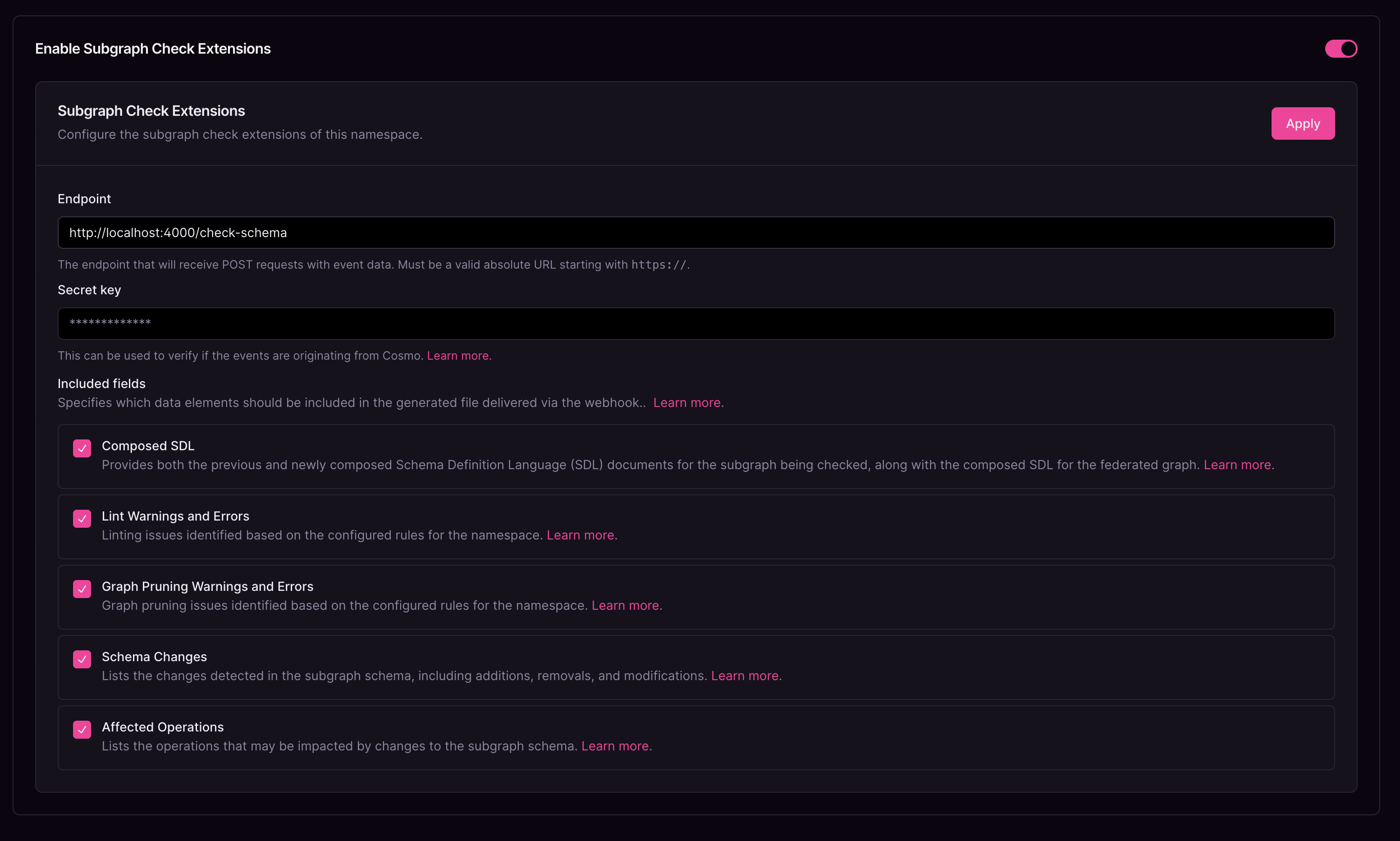
The configuration includes:
The URL where Cosmo sends POST requests.
This is used to generate an HMAC signature (X-Cosmo-Signature-256) so you can verify the request came from Cosmo.
You will choose what information gets sent:
- Composed SDL
- Lint warnings and errors
- Graph pruning warnings and errors
- Schema changes
- Affected operations
These match the data options shown in the UI.
The flow works as follows:
- Register an endpoint.
- Choose what data Cosmo sends.
- Run a subgraph check as usual.
- Cosmo triggers the extension and displays the result.
If the file is incorrect, the check fails. After correcting it, the extension runs normally. If there is an error, Cosmo displays that error as a lint issue.
If the endpoint is not configured correctly, the check details show the metadata, the URL, the response, and any failure information. You can see the same error message in both the CLI output and the checks page.
Below are examples of rules your team can implement:
For example:
- A field name matches a specific case.
- A type name ends with
Object. - An enum ends with
Enum.
These are not included by default, so a team would implement these checks in their own service and return an error when something doesn't match.
Because the composed SDL file is provided, a team can send it to an LLM, and if the model finds something they consider wrong, their service can fail the check based on that.
Teams can use TypeScript, ASP, C, PHP, Go, or whatever backend they already run. Cosmo sends an HTTP request and waits for the response.
To ensure the data comes from a trusted source, an HMAC signature is included in the X-Cosmo-Signature-256 header.
When you configure the extension, you need to provide a secret key. Your server computes the signature and compares it with the header.
Here is an example from the docs:
A matching signature confirms the request was generated by Cosmo and not altered in transit.
To set up an extension, you need to be an admin, a developer admin, or a namespace admin. To see the results, you only need access to the graph or subgraph.
This keeps teams separated from each other. If someone cannot see a graph, they cannot see its checks.
Extensions do not change permissions, they only add a way for your own logic to run during a subgraph check.
Subgraph check extensions let teams add checks that Cosmo does not include by default. Cosmo keeps doing its normal work, and your service adds whatever rules you need.
For more details, see the documentation on subgraph check extensions
Frequently Asked Questions (FAQ)
They are an enterprise add-on that lets teams run their own validation logic during a subgraph check. Cosmo sends check data to an external service and shows the results alongside its built-in lint output.
Every request includes metadata (organization, namespace, subgraph, who triggered the check) and a five-minute URL to the SDL file. You can also choose to include composed SDL, lint issues, graph pruning results, schema changes, and affected operations.
A 200 response is validated against the expected format, a 204 means the check succeeded and no further action is required, and any other status code is treated as a failure.
Cosmo includes an HMAC signature in the X-Cosmo-Signature-256 header. Your service can compute and compare the signature using the configured secret key.
Admins, developer admins, and namespace admins can configure extensions. Anyone with access to the graph or subgraph can view the check results.
Engineer at WunderGraph
Wilson Rivera is a Software Engineer at WunderGraph, where he focuses on Cosmo development and customer support.


