
An Open Source Schema Registry with Schema Checks for Federated GraphQL
Prithwish Nath
TL;DR
On large federated GraphQL APIs, merging individual service schemas easily introduces composition errors and breaking changes. WunderGraph Cosmo gives you an open source schema registry with proper validation and schema checks: a central source of truth that stores your composed federated schema and every subgraph schema, detects field/type/directive conflicts, and flags breaking changes before they reach production. You run checks with the Cosmo CLI (wgc) whenever you change a subgraph, and Cosmo can even suggest AI-assisted fixes for composition errors that you review before applying.
The GraphQL schema of a company is a dynamic entity, living, growing, and changing alongside it in response to business requirements and pivots.
The bigger the data landscape of an enterprise, the greater the chances of introducing breaking changes and errors in merging individual service schemas into a single, cohesive, unified API surface.
Wouldn’t it be cool if we had a central source of truth for schema management? A systematic approach that checks for field/type/directive conflicts to avoid these problems on large federated APIs?
You want a schema registry with proper validation and schema checks — and guess what? WunderGraph Cosmo provides exactly this feature! Let’s take a quick look at it and how it can help us!
In short: a GraphQL schema registry is a central system that stores, validates, and tracks your GraphQL schemas. In a GraphQL Federation architecture, it keeps the composed federated graph schema and each subgraph schema in one place, so teams can catch composition errors and breaking changes before publishing a schema update. In practice, schema checks effectively act as a contract enforcement layer between independently deployed subgraphs, ensuring teams can evolve safely without tightly coupling their release cycles.
Before we move forward, I wanted to make sure we’re on the same page when it comes to the tool I’ll be covering.
WunderGraph Cosmo includes open source components (Apache 2.0 license) for creating and managing federated GraphQL APIs, alongside a managed cloud offering. Using Cosmo, teams can also scale GraphQL-based architectures easily.
Cosmo is made up of different modules that make this possible:
- The Studio: It’s going to be here where you’ll spend most of your time, since this is the user-friendly UI that allows you to interact with almost everything else we’ll mention below. It contains the Schema Registry we’ll talk about today, and you can perform Schema Checks and Validation here, too.
- The Router: This component understands the Federation specification and how to bring together subgraphs into the federated graph. For each incoming query it builds a query plan, delegates execution to the relevant subgraphs (including entity resolution across them), and composes the individual responses into a single unified response for the client.
- The Control Plane: It’s the heart of the entire platform and it communicates with both the Studio and with the CLI (you can think of it as the glue binding everything together).
- The CLI: With Cosmo’s CLI, you’ll be able to create, update, and delete new schemas, validate them, start new projects and more. It talks directly to the Control Plane to perform these actions and it’s going to be one of your main points of contact with the stack.
Finally, as a note, keep in mind that Cosmo can be entirely self-hosted via Kubernetes (locally for dev via Minikube, or any K8s deployment on AKS, EKS, or GKE) and WunderGraph provides a helm chart to quickly do so. You could also opt for their managed option in the cloud , Cosmo Cloud, which is now generally available and free to get started with.
Now, let’s talk about the schema registry, and schema checks. The two work together but do different jobs: the schema registry stores schema history and the current composed state, while schema checks compare proposed changes against that state to detect composition issues and client-breaking changes before publication.
Your first stop should be the Schema registry, which is where you can see the most recent state of your federated schema. You’ll be able to read the entire composed schema in full detail (including all types, fields, directives, and subgraph schemas).
You can get to this section by clicking on the left-side menu option “Schema”:
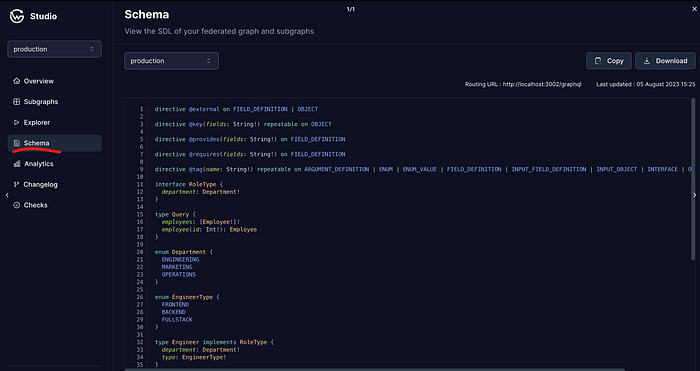
Schema registry showing the federated schema for the production environment
You can’t edit the schema here, because, after all, this is the result of composing all subgraphs. However, you can review all of them here — including individual schemas of all subgraphs in your federated graph — and even download each as a .graphql file in case you need it for any external tooling you might be using, audits, etc.
You can also use the dropdown (shown on the screenshot showing the “production” option), to select one of the subgraphs and inspect their schema directly.
Let’s now take a look at how we can do the schema checks in Cosmo.
Keep in mind that when you’re running a federated GraphQL API, you’re not just dealing with a single schema. Yes, you have the federated schema that encompasses all APIs, but you also, in practice while developing your app, have to deal with all the individual subgraph schemas.
With that said, the UI for this is quite straightforward, you’ll find the “Checks” section at the bottom of the left-hand-side menu as seen in the below screenshot:

From this table, we get 4 really interesting data points:
- The subgraph where the check was performed. Keep in mind that we’re always trying to make sure the federated graph is not broken, so we have to check before things get aggregated.
- The status of the check, clearly either “Passed” or “Failed”.
- A composability indicator. This tells you whether the new schema can be composed into the federated one without causing conflicts.
- A non-breaking change indicator showing if the changes can break existing clients.
Notice there is a subtle difference between errors in composability and breaking change.
Composability focuses on “conflicts” when merging, in other words, whether or not the schema makes sense at the end of the merge (when they all come together to form the federated version).
A breaking change on the other hand, is going to affect client applications. Breaking changes can definitely be merged into the main schema, and the schema itself will be valid, however, applications using it will have to adapt (change their code) to make it work again. It would be like changing the type of a field from a number to a string, now all of the sudden your code that only had to deal with numbers, needs to worry about alphabetic characters and check if you were doing any specific operations, that those operations are still valid for strings (like using the + operator).
In summary:
- Composition errors: The merge is NOT possible, and you cannot continue without fixing the generated conflicts.
- Breaking changes: The merge is possible, but client applications will break. You should warn the appropriate teams before merging these changes (a good way to handle this would be by versioning your APIs).
You can view any composability or breaking change in detail by clicking on the specific row. You’ll get a modal window like this one:
Screenshot taken from Cosmo’s documentation site
It’s now up to you to fix it.
Let’s take a look at how you can actually perform a schema check.
Schema checks won’t happen automatically, it’s your job to make sure you run them using Cosmo’s CLI tool (wgc) whenever you make any changes to one of the subgraphs of your API.
npx wgc subgraph check <name> --schema <path-to-schema> For example, you can check a subgraph by providing its name along with the path to the file where you store your schema locally. Keep in mind the schema needs to be valid GraphQL SDL (Schema Definition Language) — typically your subgraph SDL in a federated setup, not necessarily one complete schema file. (CLI commands evolve, so it’s worth checking the current CLI docs for the latest flags.)
For example, this could be your very simple schema file for a blogging subgraph:
Let’s now pretend you introduce a change on the Post entity because you want to change the title property to be postTitle . That’s definitely a change you can push, however, it’s also a breaking change for any app using this API. This will helpfully be highlighted in your Cosmo Studio UI!
You can also directly check for composition errors before composing and publishing changes to the federated graph with the following command:
npx wgc federated-graph check <name> --label-matcher <labels...>This will check one particular federated graph (specified by the <name> ) using the subgraphs that match the labels you specify as part of the --label-matcher parameter.
With this command you can slowly check composition between different subgraphs until you’re happy with the result, or go all-in and specify all matching labels and check if the composition of the entire API is valid.
It’s really up to you!
This is probably one of the coolest features of Cosmo: proposing AI-assisted fixes for composition problems.
Thanks to their integration with OpenAI, you can issue a command through their CLI tool that will analyze the proposed schema in the context of the federated graph, identify composition issues, and propose AI-assisted fixes for you to review.
The command looks like this:
npx wgc subgraph fix <name> --schema <path-to-schema> --out-schema <path-to-out-schema> 💡 Keep in mind that you’ll need to have your OpenAI credentials set as
OPENAI_API_KEYin the environment where Cosmo’s Control Plane runs. The Control Plane is beyond the scope of this post but you can learn more here .
With this command, you do both: validation and fixing (if needed), so you have to specify the subgraph you want to work on (it’ll also check the integration with other connected subgraphs) and the new schema you’re proposing.
The output of the command is saved in the path specified by the --out-schema parameter. The output is the proposed fixed schema (or the original one if there is nothing to fix), so review it before applying.
This is a very cool and handy option if you have a complex federated structure composed of complex schemas. When that happens the chances of introducing problems with a change are quite high, so this option is perfect to keep the workflow going with minimum effort.
Large federated APIs can be complicated to maintain, especially so if several teams work independently on each one without having any real coordination with each other (which could be the case if you’re adding external APIs into the mix).
When that happens, schema problems can easily start appearing. Thanks to tools like Cosmo, you’re now able to see those problems way before they reach production.
Are you excited about WunderGraph Cosmo? Have you tried the local deployment yet? Leave your comments below, I’d love to know your thoughts!
Frequently Asked Questions (FAQ)
A schema registry is a central source of truth for managing your federated GraphQL schemas. In Cosmo, it stores the current and historical state of your composed federated schema along with every subgraph schema, so you can review all types, fields, and directives in one place and download schemas (for example, as SDL `.graphql` files) for tooling or audits.
A composition error means the subgraph schemas cannot be merged into the federated schema at all, so you must fix the conflict before continuing. A breaking change means the merge is possible and the schema stays valid, but existing client applications will break and need to adapt, for example when a field changes from an integer to a string value.
Schema checks do not run automatically. You run them with the Cosmo CLI (wgc) whenever you change a subgraph. For example, you can run `npx wgc subgraph check <name> --schema <path-to-schema>` to check a single subgraph, passing the subgraph name and the path to its GraphQL SDL file. Cosmo Studio then shows whether the change is composable and whether it introduces breaking changes.
Yes. Use `npx wgc federated-graph check <name> --label-matcher <labels...>` to check one federated graph for composition errors using the subgraphs that match the labels you specify, before composing and publishing changes. You can incrementally check composition between subgraphs or validate the entire API at once.
Through its OpenAI integration, Cosmo can attempt to resolve composition errors with AI-assisted suggestions using `npx wgc subgraph fix <name> --schema <path-to-schema> --out-schema <path-to-out-schema>`. It validates and proposes a corrected schema, writing the result to the output path, which you should review before applying. This requires an `OPENAI_API_KEY` set in the environment where the Control Plane runs.


